
Remote Control for All TV1.0.1 - AppGallery
You'll be able to see results in few seconds.
Publisher Description


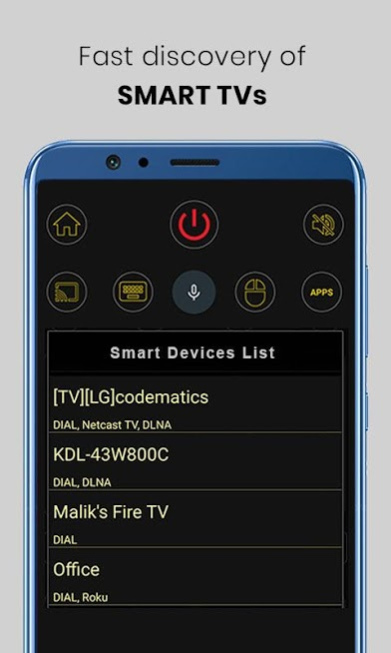

Remote Control for all TV is connect to your smart TV using WiFi and configuration happens in seconds.
TVs - Samsung, LG, Sony, Vizio, Toshiba , etc.
Cable/Satellite box - Comcast, Dish, DirecTV, , DirectTV , etc.
Streaming Media players - Apple TV, Roku, XBox, Chromecast , etc.
Home appliances ( AC and Heaters) - Samsung, LG, Panasonic , etc.
Remote uses built-in IR hardware on phone models such as LG G2/G4/G5, Huawei Honor 7 / 8, Xiaomi Mi 4 / 5 / Redmi and many more. For phones without the IR hardware such as Samsung S8 and S7, Peel uses WiFi to discover and control devices.
Easy To Use
# Remote automatically sets up all the devices in your Wi-Fi network which can be controlled through IR.
# Else, you can set up remotes for your TV and cable / satellite box and use your phone to control your TV and DTH / cable box.
Features of Remote Control for all TV.
# Power on, off, mute and unmute Control.
# Channel digits buttons.
# Volume up-down control and channel up-down control.
# Menu button with up, down, left and right controls.
# Offline universal remote for tv no need the internet connection.
# smart Tv remote control for all tv offline.
# Remote control tv on a mobile app for Android.
# Remote control for all tv brand.
What if you could control your TV with your Android device? Try this amazing tv remote for all tv to convert your android device into a universal TV remote. This app quick remote configures and TV controller app can also connect to your smart TV using wifi. This is among the best TV remote control apps available on the play store as tvremote. This is best remote and mobile remote for TVs and digital remote controller and remote control for all tv and set top box as remote control for all ac as remote control for ac and tv. Currently, world’s leading television have been included in this application and remote control for all set top box as remote control for all tv and ac. We are working continuously to include maximum television, and the remote control app will be updated accordingly as remote control ac and t v.
If your brand is not listed or the remote application is not working with your television, please drop us an email with your TV LED and remote control model and we will work on to make this application compatible with your LED TV also infrared remote control for tv and ac. It's TV universal remote. Remote control smart remote control to all devices with this universal remote control for TV app. The remote control for act setup box is very useful and remote control for act set top box as remote control for all tv and set top box act. The free tv remote control app for all set top box of and free remote control for smart tv and dish network as remote for dish tv - now free. In this app sensor remote control ac and sensor tv remote control also ac remote control without sensor remote sensor check as tv remote app. This app ac romote or tv ramot of tv remote control.
About Remote Control for All TV
The company that develops Remote Control for All TV is felix kemey. The latest version released by its developer is 1.0.1.
To install Remote Control for All TV on your Huawei device, just click the green Continue To App button above to start the installation process. The app is listed on our website since 2022-12-29 and was downloaded 0 times. We have already checked if the download link is safe, however for your own protection we recommend that you scan the downloaded app with your antivirus. Your antivirus may detect the Remote Control for All TV as malware if the download link to C102398005 is broken.
How to install Remote Control for All TV on your Huawei device:
- Click on the Continue To App button on our website. This will redirect you to Huawei Store.
- Once the Remote Control for All TV is shown in the Huawei Store listing of your Huawei device, you can start its download and installation. Tap on the Install button located below the search bar and to the right of the app icon.
- A pop-up window with the permissions required by Remote Control for All TV will be shown. Click on Accept to continue the process.
- Remote Control for All TV will be downloaded onto your device, displaying a progress. Once the download completes, the installation will start and you'll get a notification after the installation is finished.
Program Details
System requirements
Download information
Pricing
Version History
version 1.0.1
posted on 2022-12-29
Disclaimer
Official AppGallery Link
We do not host Remote Control for All TV on our servers. We did not scan it for viruses, adware, spyware or other type of malware. This app is hosted by Huawei and passed their terms and conditions to be listed there. We recommend caution when installing it.
The AppGallery link for Remote Control for All TV is provided to you by apps112.com without any warranties, representations or guarantees of any kind, so access it at your own risk.
If you have questions regarding this particular app contact the publisher directly. For questions about the functionalities of apps112.com contact us.
